Basic Concepts
In Exponential Regression and Power Regression, we review four types of log transformation for regression models with one independent variable. We now briefly examine the multiple regression counterparts to these four types of log transformations:




Level-level regression is the normal multiple regression we have studied in Least Squares for Multiple Regression and Multiple Regression Analysis. Keep in mind that the right side of these equations could also have a mix of log terms and non-log terms, such as y = b0 + b1 ln x1 + b2 x2.
Log-level regression
Log-level regression is the multivariate counterpart to exponential regression examined in Exponential Regression. Namely, by taking the exponential of each side of the equation shown above, we get the equivalent form

Similarly, the log-log regression model is the multivariate counterpart to the power regression model examined in Power Regression. We see this by taking the exponential of both sides of the equation shown above and simplifying it to get

Since any positive constant c can be expressed as eln c, we can re-express this equation by

where clearly the b0 coefficients are not the same, and where a negative value for b0 is possible as well.
Log-level example
We now give an example of where the log-level regression model is a good fit for some data.
Example 1: Repeat Example 1 of Least Squares for Multiple Regression using the data on the left side of Figure 1.

Figure 1 – Log-level transformation
The right side of the figure shows the log transformation of the price: e.g. cell G6 contains the formula =LN(C6). We next run regression data analysis on the log-transformed data. We could use the Excel Regression tool, although here we use the Real Statistics Linear Regression data analysis tool (as described in Multiple Regression Analysis) on the X input in range E5:F16 and Y input in range G5:G16. The output is shown in Figure 2.
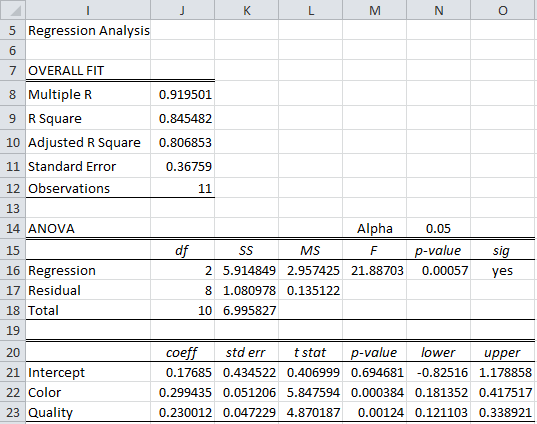
Figure 2 – Regression on log-level transformed data
The high value for R-Square shows that the log-level transformed data is a good fit for the linear regression model. Since zero is not in the 95% confidence intervals for Color or Quality, the corresponding coefficients are significantly different from zero.
LOGEST and GROWTH functions
We could also use the array formula =LOGEST(C6:C16,A6:B16,TRUE,TRUE) to obtain the following output (the labels have been manually added):
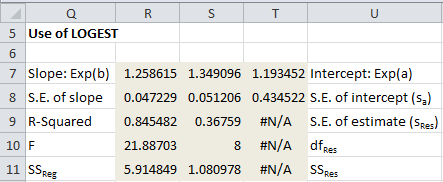
Figure 3 – Use of LOGEST function
Note that the slope/intercept values in row 7 of Figure 3 are the exponential of the linear coefficients calculated in Figure 2: e.g. the value of cell R7 is equal to EXP(J23) and the value of cell T7 is equal to EXP(J21).
We can also use the regression model to predict the price of a given diamond. For example, suppose a diamond has Color = 4 and Quality = 5 or Color = 7 and Quality = 7, then the following three approaches show how to predict the Price based on the regression model:
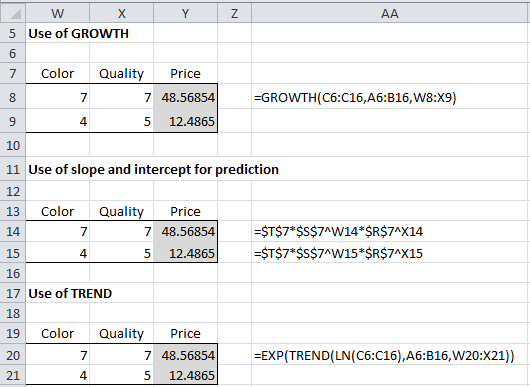
Figure 4 – Forecasting using the log-level model
Log-log regression
Example 2: Repeat Example 1 using the data on the left side of Figure 5.
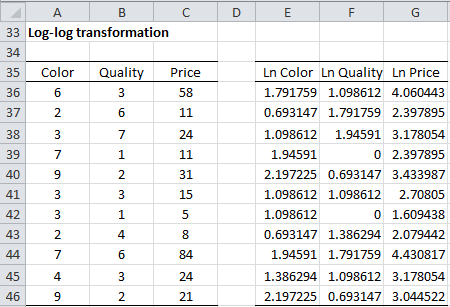
Figure 5– Log-log transformation
The right side of the figure shows the log transformation of the color, quality, and price. We next run the regression data analysis tool on the log-transformed data, i.e. with range E5:F16 as Input X and range G5:G16 as Input Y. The output is shown in Figure 6.
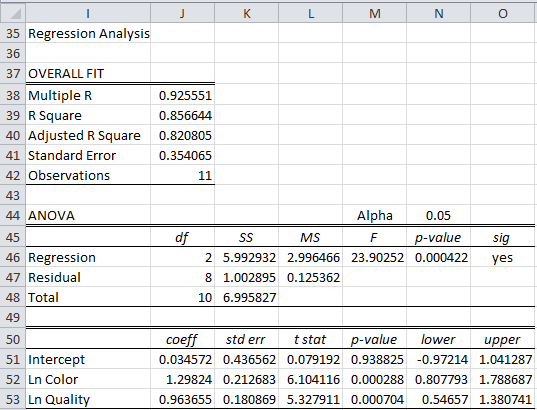
Figure 6 – Regression on log-log transformed data
As in the previous example, we see from Figure 6 that the model is a good fit for the data. We can also use the regression model for forecasting. Note that there are LOGEST or GROWTH functions for the log-log transformed models, but we still have the following two approaches for forecasting:

Figure 7 – Forecasting using the log-log model
Links
Examples Workbook
Click here to download the Excel workbook with the examples described on this webpage.
References
Yang, J. (2012) Interpreting regression coefficients for log-transformed variables. Cornell
https://10485378447908171212.googlegroups.com/attach/2580f2d6595ac/transformation%20interpretation.pdf?part=0.2&vt=ANaJVrFXAau4613bq0P64Yzc9x2BUK2zEhCfbsUcJo4rwe4IA3dqyuP8MGbJZ1vTGRs3tWTFiN9XH9LLoM0OArq5HIQjygHrYmQBr0nip2QBWJ9uiutdskE
Microsoft Support (2013) LOGEST function
https://support.microsoft.com/en-us/office/logest-function-f27462d8-3657-4030-866b-a272c1d18b4b
Microsoft Support (2013) GROWTH function
https://support.microsoft.com/en-us/office/growth-function-541a91dc-3d5e-437d-b156-21324e68b80d
Hi Charles,
sorry for the simple question:
Is the regression coefficient shown in Figure 6 standardized or unstandardized?
Thanks in advance
Hi Gabi,
Actually, a good question!
Since I didn’t standardize any of the data, I believe the regression coefficients are unstandardized.
Charles